One Mac to rule them all?
I have been doing some writing of late with regards to why I went over to Mac after being Android and PC all my life. Simple answer is ecosystem. I won’t waste time here about the journey to Mac as I plan on doing that in another posting. In its stead I will address one of the most commonly asked questions on Twitter’s Tech scene.
What’s the best MacBook?
As with everything concerning the “best” of anything, the answer all depends on your point of view.
What do you want to do with it?
What are your benchmarks?
What are your needs?
What will you be doing with it?
All valid questions and the answers are as unique as the people that come to ask them. I can only answer from the point of view of a Web Developer, and even at that my points of view are going to be different compared to another dev and so on.
So, what are my needs?
Well my point of view is of a PHP / Full Stack Developer with some Photoshop and docker thrown in for good measure. So all in all nothing too outrageous or demanding. I am rather fortunate in my hardware, as I have:
- M1 Mac Mini 8gb
- M1 Macbook Pro (2010) 8gb
- M1 Pro Macbook Pro (2021) 16gb
( I also have a Rizen 7 PC but that’s not what we’re talking about here…)
I use a 3 monitor set up so I can use my mini for the lower 2 monitors and the top ultra wide for my laptop (the m1 pro) for coding. As you can imagine this type of set up brings up another issue of how best to control them. Now, I might be stupid (...Tabs don't say it...) but I don't want multiple mice and keyboards littering my desks and I hate KVM's. So my answer was to use a Logitech 3 channel Bluetooth keyboard and 3 channel mouse. I also have a larger full size version of the keyboard) This way I can jump between both my systems and not need to worry about extra hardware. For audio, I use a headphone amp that allows my mini, macbook and PC to share 1 set of headphones, I have previously blogged about them here.
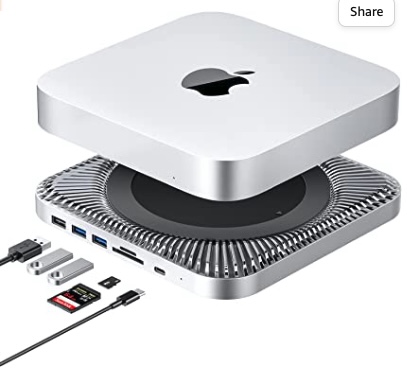 The Mac mini is my daily desktop machine. 8gb is perfect for YouTube, Facebook, Twitter Emails and just media consumption. I also chat on Discord and use it for Zoom/Teams, some light Photoshop work & calls etc. The Mini and the M1 MacBook are more or less identical in this regard and it performs perfectly.
I have added a docking station to my Mini to expand and enhance it.
It boasts some nice benefits for boosting your Mac Mini.
- 2.5 inch SATA interface within 2TB expansion
- 2 USB 3.0 interfaces - up to 5Gbps
- 2 USB 2.0 interfaces - up to 480Mbps
- Micro SD/SD card readers - up to 480Mbps
2020 M1 Macbook Pro

The 2020 M1 MacBook Pro on a base level comes with some of the following specs.
- 13.3-inch (diagonal) LED-backlit display with IPS technology; 2560-by-1600 native resolution at 227 pixels
Supported resolutions:
- 1680 by 1050
- 1440 by 900
- 1024 by 640
Apple M1 Chip
- 8-core CPU with 4 performance cores and 4 efficiency cores
- 8-core GPU
- 16-core Neural Engine
The Great USB issue
It has only 2 USB C ports located on the left hand side either one of which can double ad the charging port which then leaves you with only 1 port to connect a USB device!
As with all things there are work arounds, as you will have noticed no physical LAN port exists but I killed 2 birds with one stone by using a “dongle” (interface?) like this one.
This adapter (there are multiple ones almost identical to this) will let you add:
- HDMI
- 1 USB c
- SD Card Reader
- 2x USB 3 ports
I have also purchased another add-on / interface that is similar but more powerful
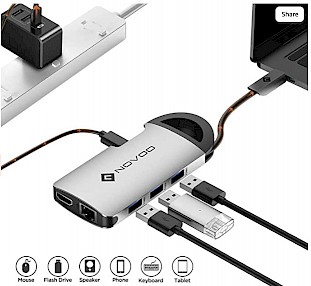
- 1 Ethernet port,
- 1 Type C charging port with Power Delivery,
- 1 4K USB C to HDMI port,
- 3 USB 3.0 ports,
- 1 SD card reader,
- 1 TF card reader
Touchbar
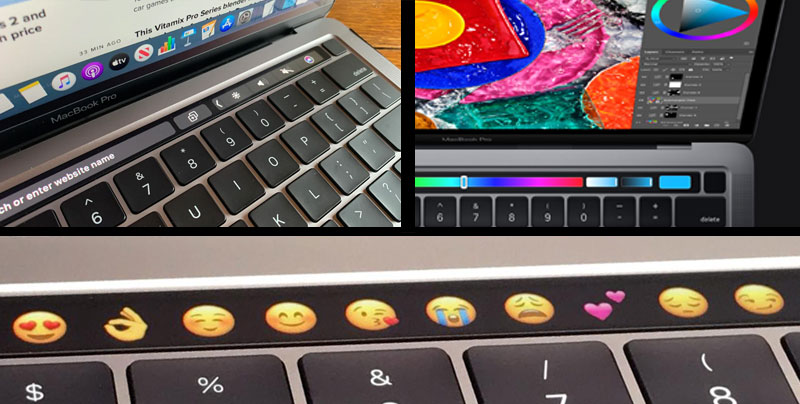
The 2020 comes with a Touch Bar in place of the F keys but unlike the previous Touch Bar MacBooks this comes with a physical escape key previously something of an oversight.
The Touch Bar works well IF you are prepared to actually use it. As you can see from the image above certain applications can take over the touch bar like photoshop will use sliders and colour selectors inside it. Chat applications show text corrections and emotes etc. All of these are nice and do take some getting use to but ultimately worth while. And I’m more than happy with this as my personal non work laptop.
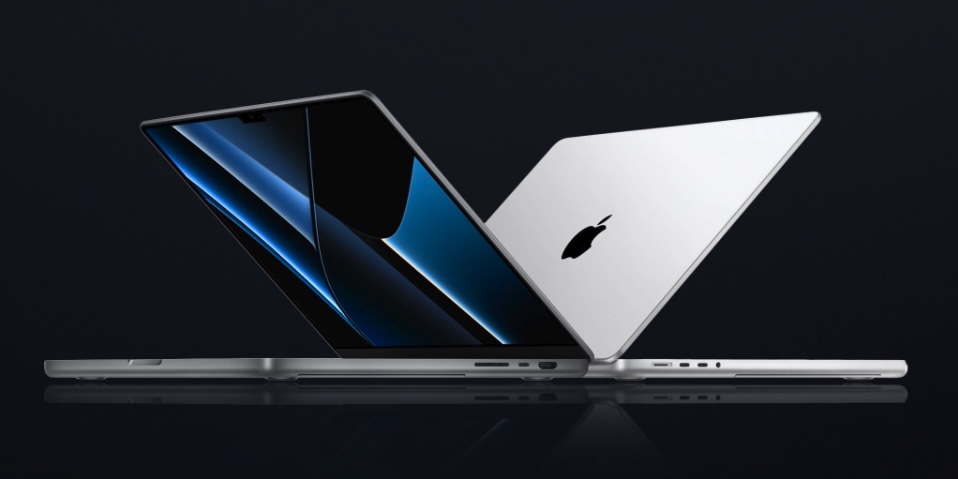
The 2021 M1 Pro MacBook Pro
For my development platform I opted for a 2021 M1 Pro MacBook Pro 14 Inch. The technical specs are not a huge leap from the previous but enough to make me opt to keep this one if I ever had to make a choice between them all.
M1 Pro 14 Inch Specs
- 8-core CPU with 6 performance cores
- 2 efficiency cores
- 14-core GPU
- 16-core Neural Engine
- (mine is 16gb memory)
The 14-inch and 16-inch MacBook Pros are the first Apple laptops to use mini-LED screens, which Apple calls Liquid Retina XDR. Used in the 12.9-inch iPad Pro, mini-LED is a backlighting technology that has several more LEDs than what is currently implemented. This results in better control of the backlight, better image contrast, and greater dynamic range.
Apple’s specs for the display include a 1,000,000:1 contrast ratio, 1,000 nits of full‑screen brightness and 1,600 nits of peak brightness. The 14-inch model has a native resolution of 3024-by-1964 at 254 pixels per inch. The display also support the P3 colour gamut and True Tone.
It has
- 1 audio jack,
- 1 full size HDMI socket
- 3 USB c Sockets
- 1 magsafe power socket
I have a USB C port being used for a monitor (yes it can do that…) and while desk bound I use magsafe, but when out and about I use one of the USB C sockets to power it. I always have 2 power bricks so I can leave one at home and take one when I travel to and from the office.
So this is my run down and thoughts, feel free to have your own. If you like comment below or ask questions and I'll try answering them.